Downloading logs
This section describes how regular (non-Hadoop) and Hadoop users can access and download logs.
Without current jobs
If there are no jobs running:
-
In Terminal, enter
cd /tmp/h2o-<UserName>/h2ologs(where<UserName>is your computer user name), then enterls -lto view a list of the log files.The
httpdlog contains the request/response status of all REST API transactions. The rest of the logs use the formath2o_<IPaddress>_<Port>-<LogLevel>-<LogLevelName>.log, where:<IPaddress>is the bind address of the H2O instance<Port>is the port number<LogLevel>is the numerical log level (1-6, with 6 as the highest severity level)<LogLevelName>is the name of the log level (trace, debug, info, warn, error, or fatal).
With current jobs
If your job is still running:
-
Download the logs with
h2o.download_all_logs()in Python orh2o.downloadAllLogs()in R. Both acceptdirnameandfilename; the REST equivalent isGET /3/Logs/download.When you view the log, the output displays the location of log directory after
Log dir:(as shown in the last line in the following example):05-06 17:12:15.610 172.16.2.179:54321 26336 main INFO: ----- H2O started -----05-06 17:12:15.731 172.16.2.179:54321 26336 main INFO: Build git branch: master05-06 17:12:15.731 172.16.2.179:54321 26336 main INFO: Build git hash: 41d039196088df081ad77610d3e2d6550868f11b05-06 17:12:15.731 172.16.2.179:54321 26336 main INFO: Build git describe: jenkins-master-118705-06 17:12:15.732 172.16.2.179:54321 26336 main INFO: Build project version: 0.3.0.118705-06 17:12:15.732 172.16.2.179:54321 26336 main INFO: Built by: 'jenkins'05-06 17:12:15.732 172.16.2.179:54321 26336 main INFO: Built on: '2015-05-05 23:31:12'05-06 17:12:15.732 172.16.2.179:54321 26336 main INFO: Java availableProcessors: 805-06 17:12:15.732 172.16.2.179:54321 26336 main INFO: Java heap totalMemory: 982.0 MB05-06 17:12:15.732 172.16.2.179:54321 26336 main INFO: Java heap maxMemory: 982.0 MB05-06 17:12:15.732 172.16.2.179:54321 26336 main INFO: Java version: Java 1.7.0_80 (from Oracle Corporation)05-06 17:12:15.733 172.16.2.179:54321 26336 main INFO: OS version: Linux 3.13.0-51-generic (amd64)05-06 17:12:15.733 172.16.2.179:54321 26336 main INFO: Machine physical memory: 31.30 GB05-06 17:12:15.733 172.16.2.179:54321 26336 main INFO: X-h2o-cluster-id: 143095753534405-06 17:12:15.733 172.16.2.179:54321 26336 main INFO: Possible IP Address: virbr0 (virbr0), 192.168.122.105-06 17:12:15.733 172.16.2.179:54321 26336 main INFO: Possible IP Address: br0 (br0), 172.16.2.17905-06 17:12:15.733 172.16.2.179:54321 26336 main INFO: Possible IP Address: lo (lo), 127.0.0.105-06 17:12:15.733 172.16.2.179:54321 26336 main INFO: Multiple local IPs detected:05-06 17:12:15.733 172.16.2.179:54321 26336 main INFO: /192.168.122.1 /172.16.2.17905-06 17:12:15.733 172.16.2.179:54321 26336 main INFO: Attempting to determine correct address...05-06 17:12:15.733 172.16.2.179:54321 26336 main INFO: Using /172.16.2.17905-06 17:12:15.734 172.16.2.179:54321 26336 main INFO: Internal communication uses port: 5432205-06 17:12:15.734 172.16.2.179:54321 26336 main INFO: Listening for HTTP and REST traffic on http://172.16.2.179:54321/05-06 17:12:15.744 172.16.2.179:54321 26336 main INFO: H2O cloud name: 'H2O_29570' on /172.16.2.179:54321, discovery address /237.61.246.13:6073305-06 17:12:15.744 172.16.2.179:54321 26336 main INFO: If you have trouble connecting, try SSH tunneling from your local machine (e.g., via port 55555):05-06 17:12:15.744 172.16.2.179:54321 26336 main INFO: 1. Open a terminal and run 'ssh -L 55555:localhost:54321 yarn@172.16.2.179'05-06 17:12:15.744 172.16.2.179:54321 26336 main INFO: 2. Point your browser to http://localhost:5555505-06 17:12:15.979 172.16.2.179:54321 26336 main INFO: Log dir: '/tmp/h2o-jessica/h2ologs'
Logging in R
To view the REST API logs from R:
-
In R, enter
h2o.startLogging(). The output displays the location of the REST API logs:> h2o.startLogging()Appending REST API transactions to log file /var/folders/ylcq5nhky53hjcl9wrqxt39kz80000gn/T//RtmpE7X8Yv/rest.log -
Copy the displayed file path. In Terminal, enter
lessand paste the file path. -
Press Enter. A time-stamped log of all REST API transactions displays.
------------------------------------------------------------Time: 2015-01-06 15:46:11.083GET http://172.16.2.20:54321/3/Cloud.jsonpostBody:curlError: FALSEcurlErrorMessage:httpStatusCode: 200httpStatusMessage: OKmillis: 3{"__meta":{"schema_version": 1,"schema_name":"CloudV1","schema_type":"Iced"},"version":"0.1.17.1009","cloud_name":...[truncated]}-------------------------------------------------------------
To download the logs using R:
In R, enter the command h2o.downloadAllLogs(filename = "logs.zip"), where filename is the specified filename for the logs. Note that you must include the .zip extension.
Logging in Python
To download the logs using Python:
In Python, enter the command h2o.download_all_logs(dirname='./your_directory_name/', filename = 'autoh2o_log.zip'), where autoh2o_log.zip will download to a folder that is one down from where you are currently working into a directory called your_directory_name. Please note that your_directory_name should be replaced with the name of a directory that you've created and that already exists.
Hadoop users
Depending on whether you are using Hadoop with H2O-3 Secure and whether the job is currently running, there are different ways of obtaining the logs for H2O-3 Secure.
Copy and email the logs to support@h2o.ai with a brief description of your Hadoop environment, including the Hadoop distribution and version.
Without running jobs
-
If you are using Hadoop and the job is not running, view the logs by using the
yarn logs -applicationIdcommand. When you start an H2O-3 Secure instance, the complete command displays in the output:jessica@mr-0x8:~/h2o-3.1.0.3008-cdh5.2$ hadoop jar h2odriver.jar -nodes 1 -mapperXmx 6g -output hdfsOutputDirNameDetermining driver host interface for mapper->driver callback...[Possible callback IP address: 172.16.2.178][Possible callback IP address: 127.0.0.1]Using mapper->driver callback IP address and port: 172.16.2.178:52030(You can override these with -driverif and -driverport.)Memory Settings:mapreduce.map.java.opts: -Xms1g -Xmx1g -Dlog4j.defaultInitOverride=trueExtra memory percent: 10mapreduce.map.memory.mb: 112615/05/06 17:11:50 INFO client.RMProxy: Connecting to ResourceManager at mr-0x10.0xdata.loc/172.16.2.180:803215/05/06 17:11:52 INFO mapreduce.JobSubmitter: number of splits:115/05/06 17:11:52 INFO mapreduce.JobSubmitter: Submitting tokens for job: job_1430127035640_007515/05/06 17:11:52 INFO impl.YarnClientImpl: Submitted application application_1430127035640_007515/05/06 17:11:52 INFO mapreduce.Job: The url to track the job: http://mr-0x10.0xdata.loc:8088/proxy/application_1430127035640_0075/Job name 'H2O_29570' submittedJobTracker job ID is 'job_1430127035640_0075'For YARN users, logs command is 'yarn logs -applicationId application_1430127035640_0075'Waiting for H2O cluster to come up...
In the above example, the command is specified in the next to last line (For YARN users, logs command is...). The command is unique for each instance. In Terminal, enter yarn logs -applicationId application_<UniqueID> to view the logs (where <UniqueID> is the number specified in the next to last line of the output that displayed when you created the cluster).
Use YARN to obtain the stdout and stderr logs that are used for troubleshooting. To learn how to access YARN based on management software, version, and job status, see Accessing YARN.
-
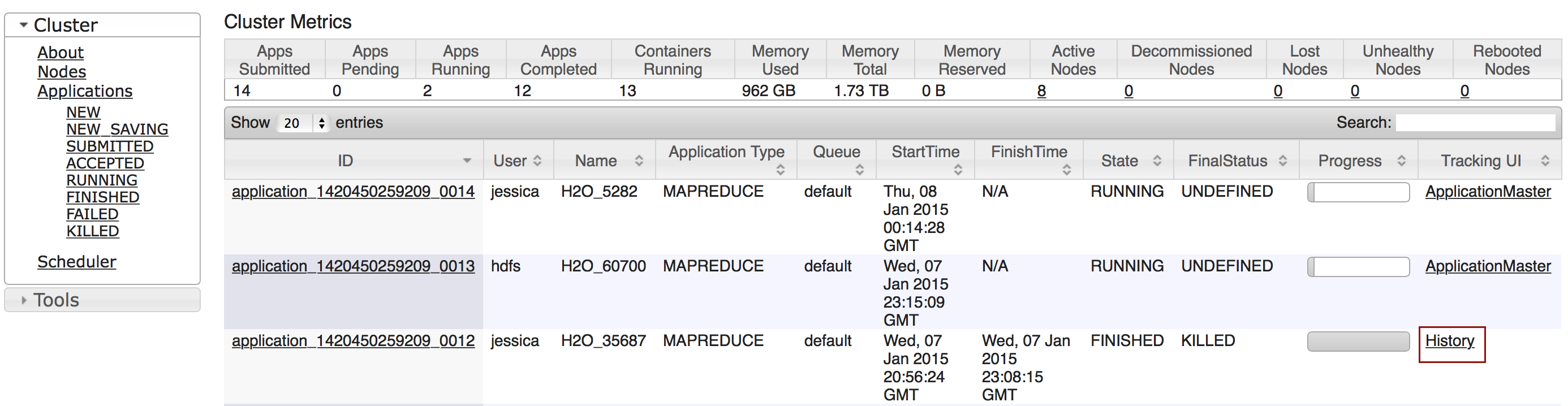
Click the Applications link to view all jobs, then click the History link for the job.
-
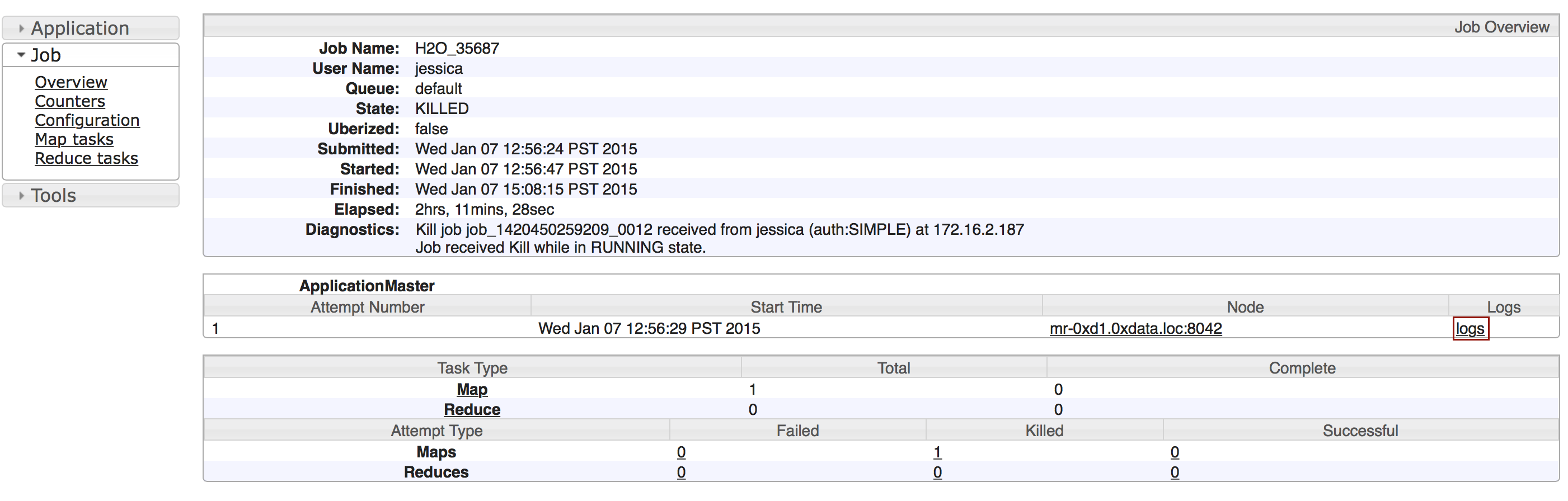
Click the logs link.
-
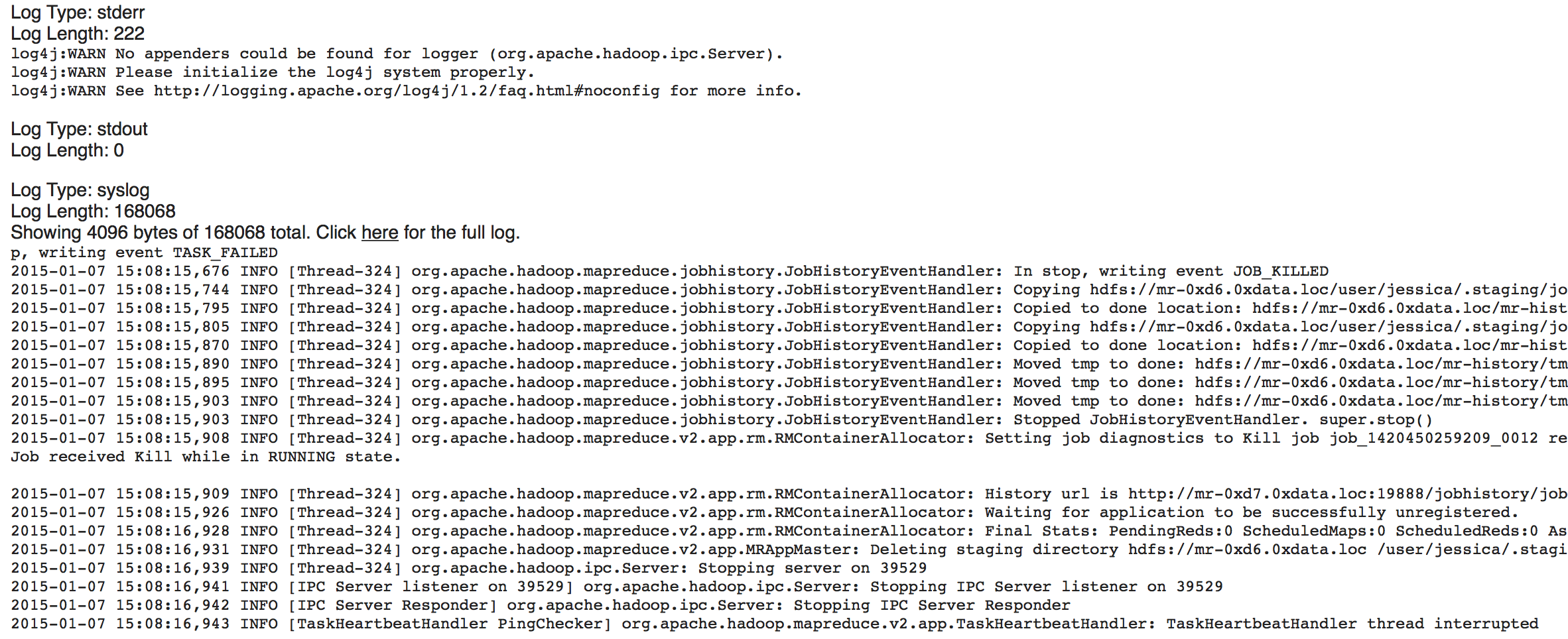
Copy the information that displays and send it in an email to support@h2o.ai.
With running jobs
If you are using Hadoop and the job is still running:
-
Use YARN to obtain the
stdoutandstderrlogs that are used for troubleshooting. To learn how to access YARN based on management software, version, and job status, see Accessing YARN.-
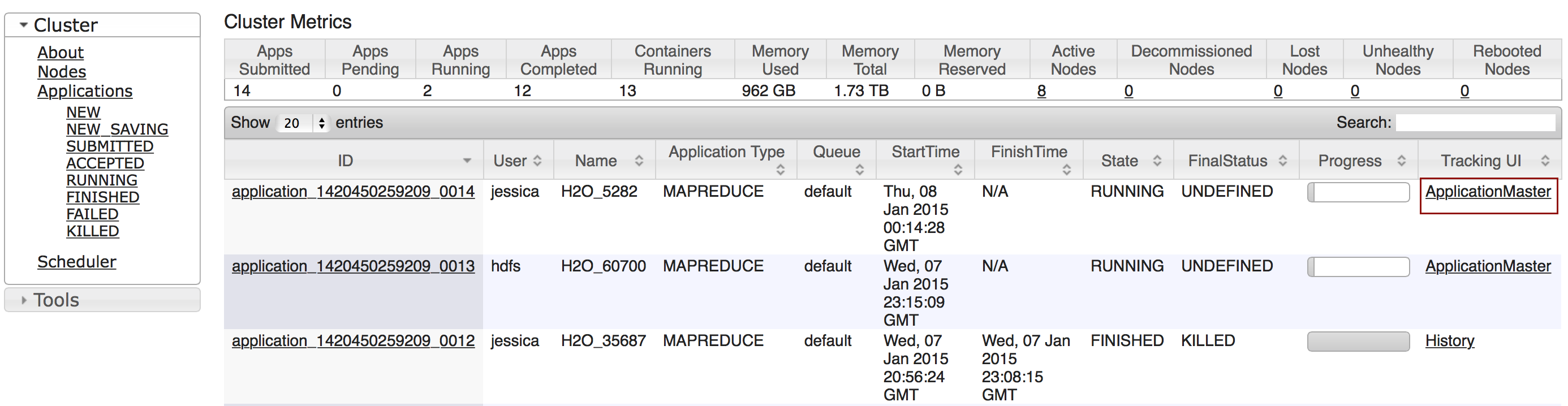
Click the Applications link to view all jobs, then click the ApplicationMaster link for the job.
-
Select the job from the list of active jobs.

-
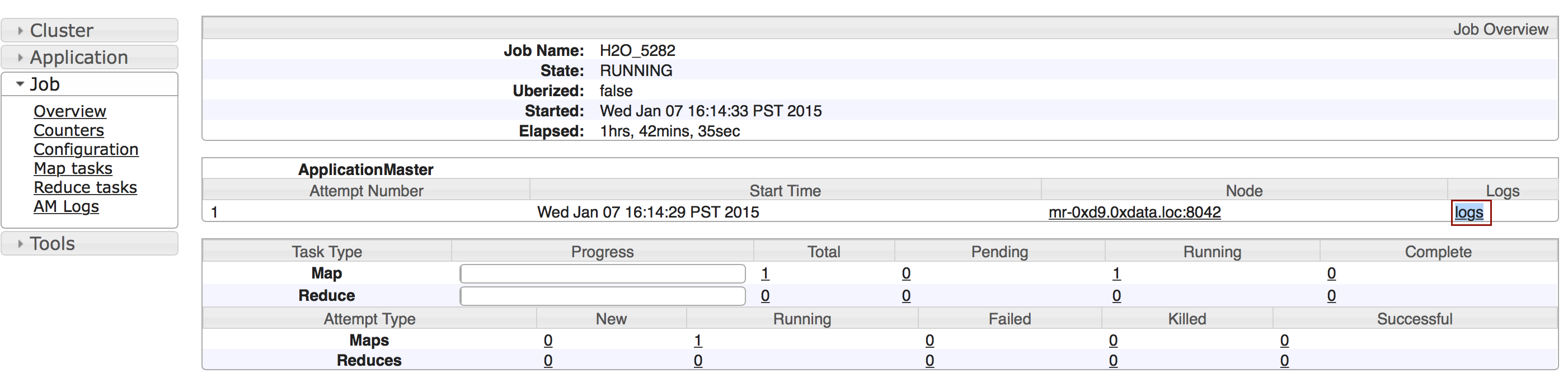
Click the logs link.
-
Send the contents of the displayed files to support@h2o.ai.

-
-
Download the logs with
h2o.download_all_logs()in Python orh2o.downloadAllLogs()in R. Both acceptdirnameandfilename; the REST equivalent isGET /3/Logs/download.The H2O-3 Secure node log shows the location of the log directory after
Log dir:(as shown in the last line of the following example):05-06 17:12:15.610 172.16.2.179:54321 26336 main INFO: ----- H2O started -----05-06 17:12:15.731 172.16.2.179:54321 26336 main INFO: Build git branch: master05-06 17:12:15.731 172.16.2.179:54321 26336 main INFO: Build git hash: 41d039196088df081ad77610d3e2d6550868f11b05-06 17:12:15.731 172.16.2.179:54321 26336 main INFO: Build git describe: jenkins-master-118705-06 17:12:15.732 172.16.2.179:54321 26336 main INFO: Build project version: 0.3.0.118705-06 17:12:15.732 172.16.2.179:54321 26336 main INFO: Built by: 'jenkins'05-06 17:12:15.732 172.16.2.179:54321 26336 main INFO: Built on: '2015-05-05 23:31:12'05-06 17:12:15.732 172.16.2.179:54321 26336 main INFO: Java availableProcessors: 805-06 17:12:15.732 172.16.2.179:54321 26336 main INFO: Java heap totalMemory: 982.0 MB05-06 17:12:15.732 172.16.2.179:54321 26336 main INFO: Java heap maxMemory: 982.0 MB05-06 17:12:15.732 172.16.2.179:54321 26336 main INFO: Java version: Java 1.7.0_80 (from Oracle Corporation)05-06 17:12:15.733 172.16.2.179:54321 26336 main INFO: OS version: Linux 3.13.0-51-generic (amd64)05-06 17:12:15.733 172.16.2.179:54321 26336 main INFO: Machine physical memory: 31.30 GB05-06 17:12:15.733 172.16.2.179:54321 26336 main INFO: X-h2o-cluster-id: 143095753534405-06 17:12:15.733 172.16.2.179:54321 26336 main INFO: Possible IP Address: virbr0 (virbr0), 192.168.122.105-06 17:12:15.733 172.16.2.179:54321 26336 main INFO: Possible IP Address: br0 (br0), 172.16.2.17905-06 17:12:15.733 172.16.2.179:54321 26336 main INFO: Possible IP Address: lo (lo), 127.0.0.105-06 17:12:15.733 172.16.2.179:54321 26336 main INFO: Multiple local IPs detected:05-06 17:12:15.733 172.16.2.179:54321 26336 main INFO: /192.168.122.1 /172.16.2.17905-06 17:12:15.733 172.16.2.179:54321 26336 main INFO: Attempting to determine correct address...05-06 17:12:15.733 172.16.2.179:54321 26336 main INFO: Using /172.16.2.17905-06 17:12:15.734 172.16.2.179:54321 26336 main INFO: Internal communication uses port: 5432205-06 17:12:15.734 172.16.2.179:54321 26336 main INFO: Listening for HTTP and REST traffic on http://172.16.2.179:54321/05-06 17:12:15.744 172.16.2.179:54321 26336 main INFO: H2O cloud name: 'H2O_29570' on /172.16.2.179:54321, discovery address /237.61.246.13:6073305-06 17:12:15.744 172.16.2.179:54321 26336 main INFO: If you have trouble connecting, try SSH tunneling from your local machine (e.g., via port 55555):05-06 17:12:15.744 172.16.2.179:54321 26336 main INFO: 1. Open a terminal and run 'ssh -L 55555:localhost:54321 yarn@172.16.2.179'05-06 17:12:15.744 172.16.2.179:54321 26336 main INFO: 2. Point your browser to http://localhost:5555505-06 17:12:15.979 172.16.2.179:54321 26336 main INFO: Log dir: '/home2/yarn/nm/usercache/jessica/appcache/application_1430127035640_0075/h2ologs'
- On the mapper host, go to the directory shown in the
Log dir:line of the node log, then enterls -lto view a list of the log files. Thehttpdlog contains the request/response status of all REST API transactions. The rest of the logs use the formath2o_<IPaddress>_<Port>-<LogLevel>-<LogLevelName>.log, where<IPaddress>is the bind address of the H2O-3 Secure instance,<Port>is the port number,<LogLevel>is the numerical log level (1-6, with 6 as the highest severity level), and<LogLevelName>is the name of the log level (trace, debug, info, warn, error, or fatal).
Accessing YARN
Methods for accessing YARN vary depending on the default management software and version, as well as job status.
Cloudera 5 & 5.2
-
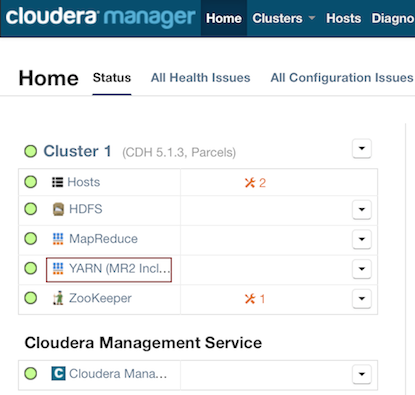
In Cloudera Manager, click the YARN link in the cluster section.
-
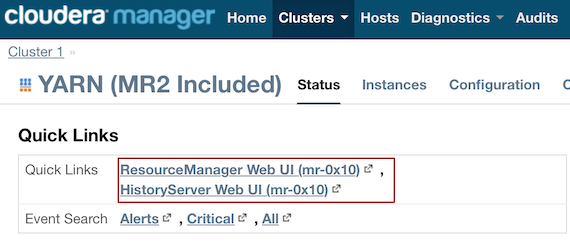
In the Quick Links section, select ResourceManager Web UI if the job is running or select HistoryServer Web UI if the job is not running.
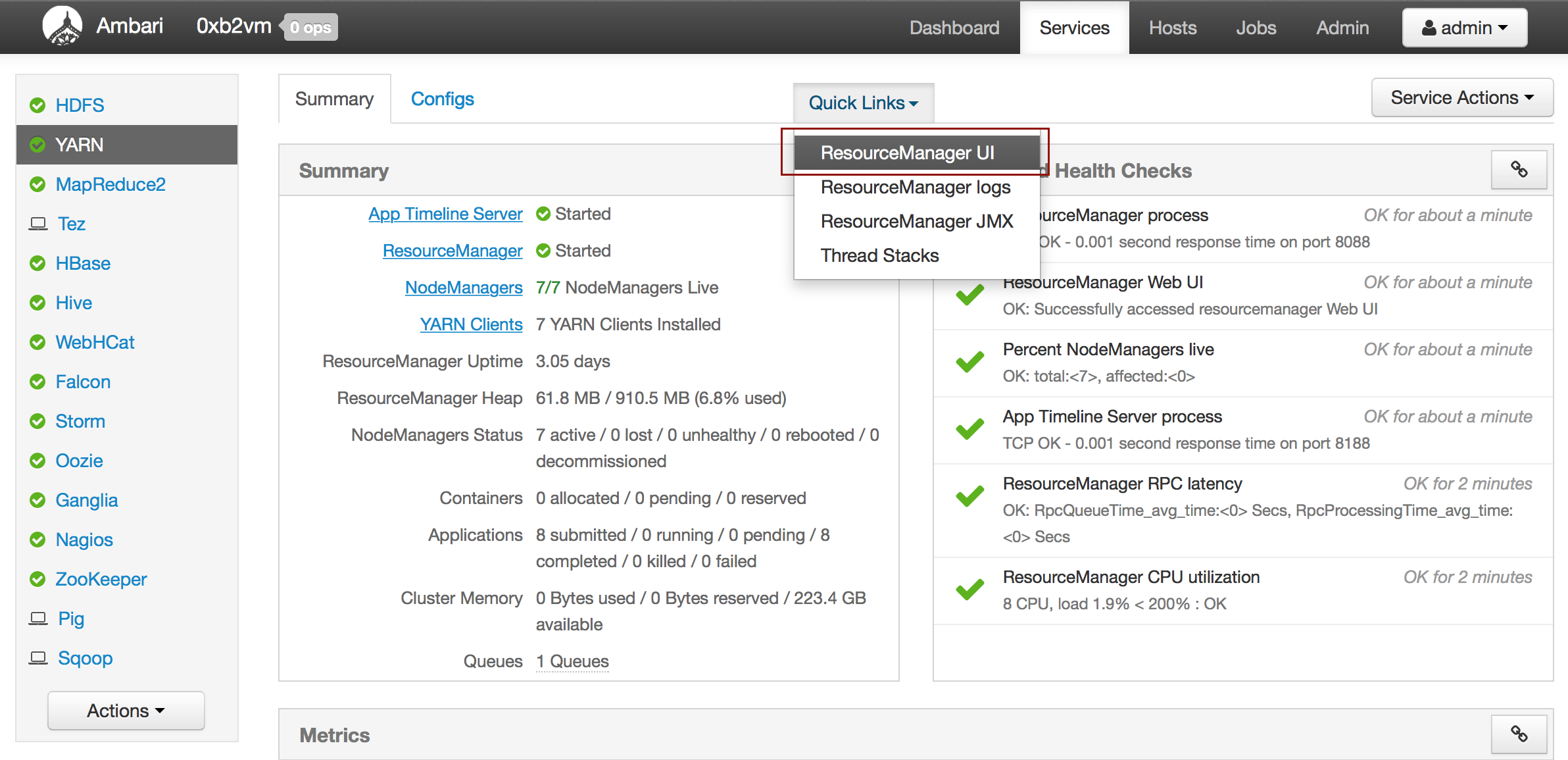
Ambari
-
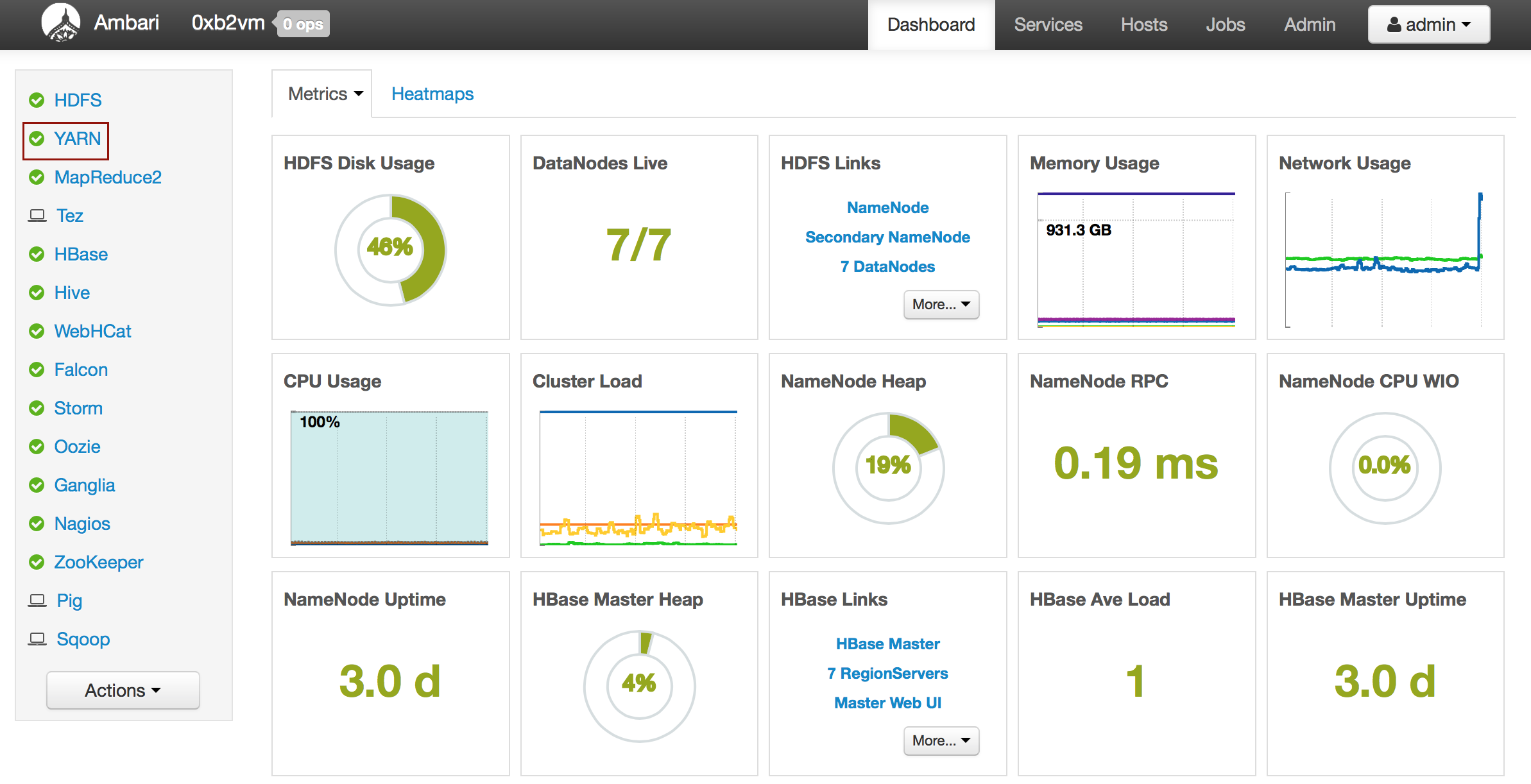
From the Ambari Dashboard, select YARN.
-
From the Quick Links drop-down menu, select ResourceManager UI.
Log file structure
After you unzip the logs, you will see a number of log files (example below), of different severity levels. The different levels log different types of events as follows:
- trace: fine grained information about the running processes
- debug: information that's helpful for debugging
- info: general information about the jobs run H2O cluster (data, modeling, etc.)
- warn: indications of potential issues in your code
- error: errors while running H2O jobs -- these should be addressed in your code
- fatal: only used if the H2O cluster crashes -- you will need to restart H2O
The various log files are separated into different pieces (for example, file suffix .1, .2, .3) by their age. .log is the current log being written into, while log.1 is the one before, log.2 is older still, and so on. Each time .log reaches a certain size, it is renamed to log.1, and log.1 is renamed to log.2, etc.
-rw-r--r-- 1 ledell ledell    0 Feb  2 09:42 h2o_127.0.0.1_16537-6-fatal.log
-rw-r--r-- 1 ledell ledell    0 Feb  2 09:42 h2o_127.0.0.1_16537-5-error.log
-rw-r--r-- 1 ledell ledell 3.1M Feb  2 10:23  h2o_127.0.0.1_16537-3-info.log.3
-rw-r--r-- 1 ledell ledell 3.1M Feb  2 10:23 h2o_127.0.0.1_16537-2-debug.log.3
-rw-r--r-- 1 ledell ledell 1.1M Feb  2 10:30 h2o_127.0.0.1_16537-httpd.log.3
-rw-r--r-- 1 ledell ledell 3.1M Feb  2 10:35 h2o_127.0.0.1_16537-3-info.log.2
-rw-r--r-- 1 ledell ledell 3.1M Feb  2 10:35 h2o_127.0.0.1_16537-2-debug.log.2
-rw-r--r-- 1 ledell ledell 1.1M Feb  2 10:41 h2o_127.0.0.1_16537-1-trace.log.3
-rw-r--r-- 1 ledell ledell 1.1M Feb  2 10:54 h2o_127.0.0.1_16537-httpd.log.2
-rw-r--r-- 1 ledell ledell 1.1M Feb  2 11:18 h2o_127.0.0.1_16537-1-trace.log.2
-rw-r--r-- 1 ledell ledell 1.1M Feb  2 11:50 h2o_127.0.0.1_16537-httpd.log.1
-rw-r--r-- 1 ledell ledell 3.1M Feb  2 12:33 h2o_127.0.0.1_16537-3-info.log.1
-rw-r--r-- 1 ledell ledell 3.1M Feb  2 12:33 h2o_127.0.0.1_16537-2-debug.log.1
-rw-r--r-- 1 ledell ledell 1.1M Feb  2 12:33 h2o_127.0.0.1_16537-1-trace.log.1
-rw-r--r-- 1 ledell ledell 903K Feb  2 12:39 h2o_127.0.0.1_16537-httpd.log
-rw-r--r-- 1 ledell ledell  39K Feb  2 12:39 h2o_127.0.0.1_16537-4-warn.log
-rw-r--r-- 1 ledell ledell 286K Feb  2 12:39 h2o_127.0.0.1_16537-3-info.log
-rw-r--r-- 1 ledell ledell 286K Feb  2 12:39 h2o_127.0.0.1_16537-2-debug.log
-rw-r--r-- 1 ledell ledell 285K Feb  2 12:39 h2o_127.0.0.1_16537-1-trace.log
- Submit and view feedback for this page
- Send feedback about H2O-3 Secure to cloud-feedback@h2o.ai