AI unit consumption
The Platform Usage page lets you monitor AI unit consumption and token usage across your H2O AI Hybrid Cloud (HAIC) environment. You can view usage scoped to a specific workspace or, if you are an admin, across all workspaces.
Accessing the Platform Usage page
To open the Platform Usage page, select Cloud Environment > AI Unit Consumption from the left navigation bar. Use the workspace dropdown on the top-left of the screen to switch between workspaces and view usage data for each.
The Platform Usage page is only shown when your HAIC administrator has enabled the platformUsageEnabled feature flag.
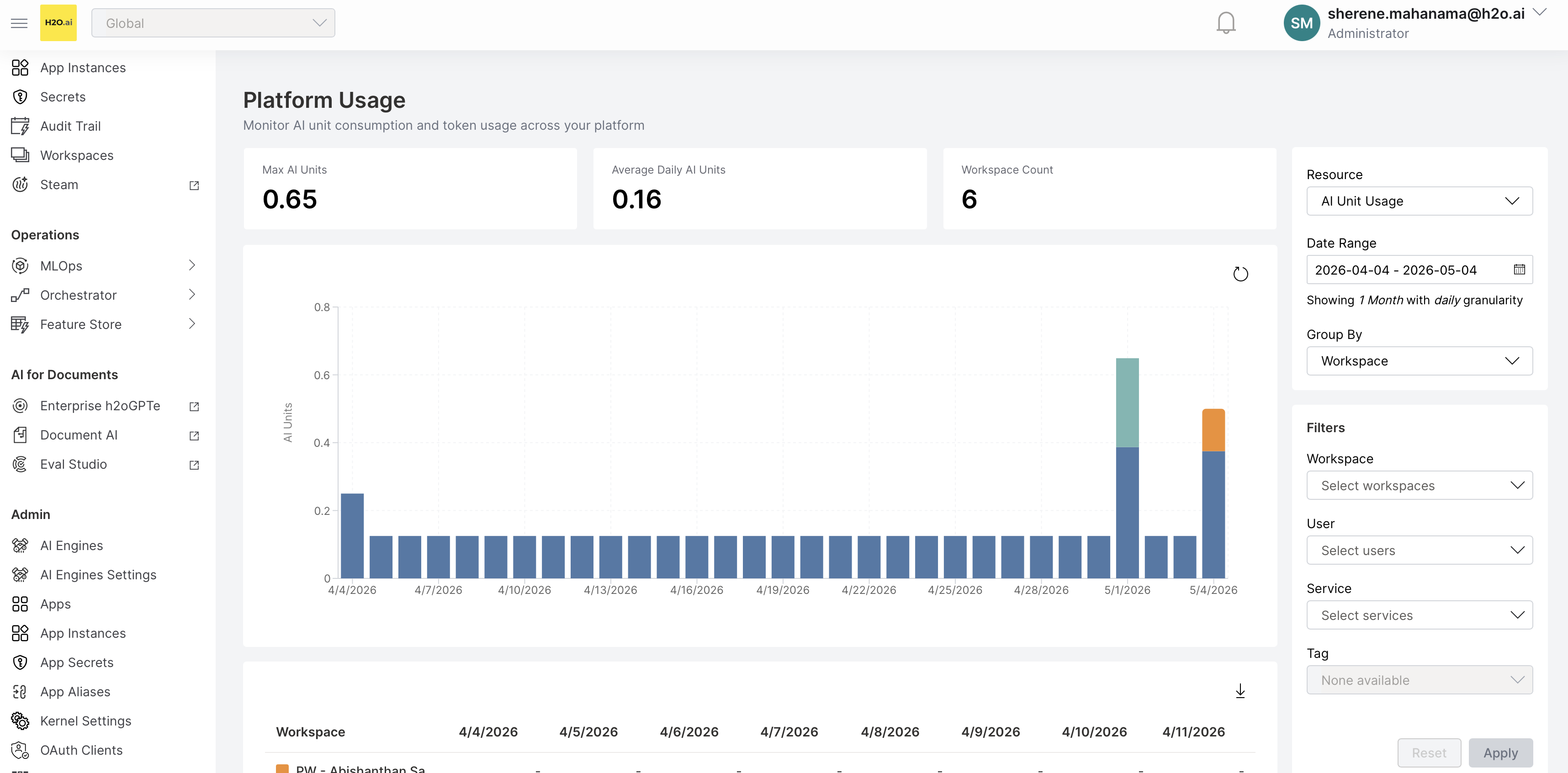
Workspace-scoped view
By default, the Platform Usage page is scoped to the currently selected workspace. All charts, tables, and filter options reflect AI unit and token usage only within that workspace.
- Non-admin users can view usage data for any workspace they own or are a member of. The workspace dropdown lists only their accessible workspaces.
- Switching workspaces reloads all chart and table data and resets any applied filters.
- In workspace-scoped mode, the Group by: Workspace option is not available (since only one workspace is in scope).
Global view (admins only)
Users in the telemetry-admin group have access to a View all workspaces checkbox in the filter panel.
- When View all workspaces is checked, the workspace dropdown in the navigation bar is disabled and the page shows data for all workspaces globally — this is the equivalent of the previous default behavior.
- When unchecked, the page returns to the standard workspace-scoped view for the currently selected workspace.
- Switching between workspace-scoped and global modes resets all applied filters and the Group by selection.
Homepage AI unit consumption widget
The HAIC homepage includes a Peak AI Unit consumption widget that shows a bar chart of daily AI unit usage for the past seven days.
- Usage values represent the sum of AI units consumed across all workspace breakdowns for each day, scoped to the currently selected workspace.
- If the selected workspace is the Global Workspace and you are not a
telemetry-admin, the widget displays an authorization error instead of data. - Clicking More analysis on the widget navigates to the full Platform Usage page.
AI unit calculation
AI unit consumption is calculated using the following formula:
AIUC = GPU × 4 + MAX((MAX(1, CPU) / 8.0 − GPU), (RAM / 64.0 − GPU), 0)
AIUC = AI Unit Consumption
- GPU: Measured in GPU cores (no distinction between GPU types is made)
- CPU: Measured in Kubernetes vCPU units (minimum of 1)
- RAM: Measured in GB (gigabytes)
AI Unit Consumption is derived from Kubernetes resource requests for each workload, not from limits or actual utilization.
- CPU and memory are based on requested resources (minimum 1 CPU core per deployment)
- Memory is measured in gigabytes
- GPU resources are mapped to a fixed number of AI units per GPU
An environment with 1 GPU, 32 vCPUs, and 64 GB RAM:
AIUC = 1 × 4 + MAX((MAX(1, 32) / 8.0 − 1), (64 / 64.0 − 1), 0)
AIUC = 4 + MAX(3, 0, 0)
AIUC = 7 AI Units
- Submit and view feedback for this page
- Send feedback about H2O AI Cloud | Docs to cloud-feedback@h2o.ai