Raw data export to Kafka
Monitoring supports exporting raw scoring data to Kafka. This feature allows you to process scoring data in ways required by your internal regulations. Request and response data from scoring operations can be sent to a specified Kafka topic for downstream processing, auditing, or debugging. The MLOps administrator enables this feature.
During model deployment with monitoring enabled, scoring data and response data are sent to a default topic configured by the MLOps administrator. Users can optionally specify a custom Kafka topic where the data is sent for this particular deployment. This allows separating data streams per deployment for improved observability. This configuration has no effect when the Kafka integration is disabled by the administrator.
The following image shows the Kafka topic configuration during deployment setup:
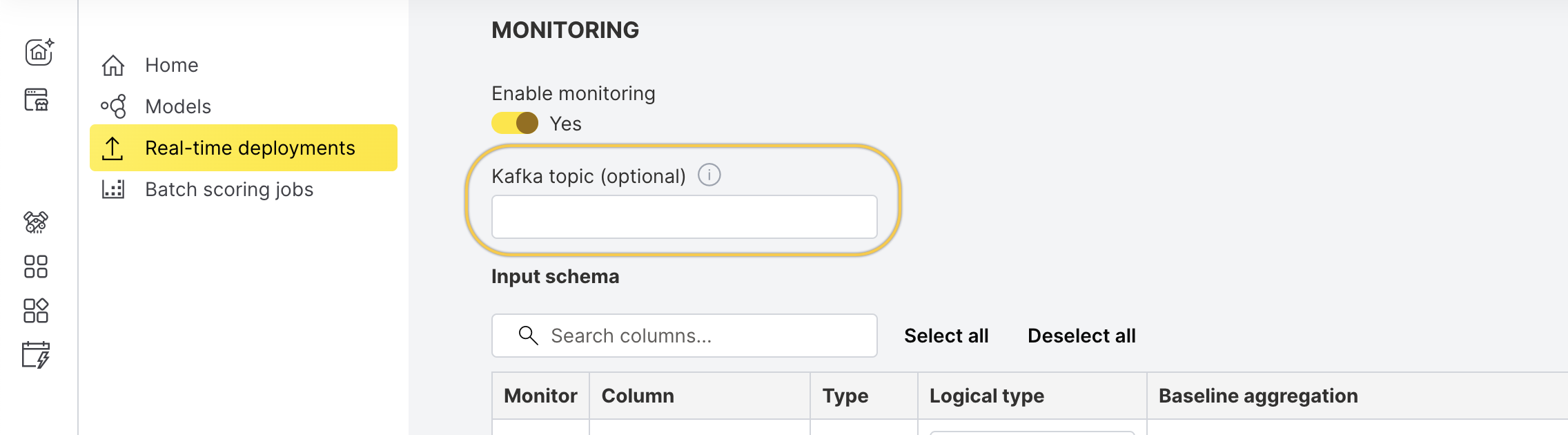
The custom Kafka topic must exist before deploying the model. Monitoring will not attempt to create the topic automatically.
Once configured, the monitoring captures raw request and response data from scoring operations and forwards it to the configured Kafka topic (global or deployment-specific).
Message format
H2O MLOps produces one JSON Kafka message per successfully scored request to POST /model/score. A request produces no message in any of these cases:
- The deployment can't read the request body, including a request that exceeds the deployment's request size limit.
- The
Content-Typeheader is not exactlyapplication/json. A value such asapplication/json; charset=utf-8produces no message. - The scorer answers with a status of 400 or higher.
- The request goes to another scoring endpoint, such as
POST /model/contributionorPOST /model/media-score. - The request goes to an OpenAI-compatible LLM endpoint (
/v1/chat/completions,/v1/completions,/v1/embeddings, or/v1/models).
In each case, the audit trail is the only record of the interaction. H2O MLOps audits LLM traffic but doesn't capture it for monitoring, so an LLM deployment leaves the topic empty.
The Kafka record carries a value with no key and no headers, so messages from one deployment spread across the topic's partitions and arrive in no guaranteed order.
Every message shares the same envelope: the request half in input, the response half in output, a timestamp for each half, and the deployment's labels.
Sample message:
{
  "input": {
    "fields": ["LIMIT_BAL", "AGE"],
    "rows": [["120000", "34"]]
  },
  "output": {
    "id": "f0395bc4-47d0-11ec-b7eb-fad6d6e23f65",
    "fields": ["default payment next month.0", "default payment next month.1"],
    "score": [["0.6144353", "0.38556466"]]
  },
  "input-timestamp": "2026-08-06T09:14:22.481937512Z",
  "output-timestamp": "2026-08-06T09:14:22.503118764Z",
  "labels": {
    "artifact-type": "dai_mojo_pipeline",
    "deployment-id": "c4d9a1b7-3e58-4f2a-9c61-7b0d2e845af3",
    "deployment-mode": "SINGLE_DEPLOYMENT",
    "experiment-id": "1f7c4d2e-9a03-4b55-8ef1-6c2a90d3b714",
    "experiment-name": "credit-default-gbm-v4",
    "experiment-status": "FINISHED",
    "model-id": "5b81f2c6-7d34-49ae-a0b2-3f95c6187de2",
    "model-name": "credit-default-gbm",
    "model-type": "DAI MOJO Pipeline",
    "model-version-id": "e27a6b90-15cf-4d83-9a47-c8b0e3f21645",
    "project-id": "6b21e83d-0c74-4a19-9f52-8d4e7b160c35",
    "project-name": "credit-default-risk",
    "runtime-image": "h2oai/dai-mojo-scorer:1.10.7",
    "workspace-id": "a03e5c18-42b7-4d90-b6f3-1e8c7a25d904"
  }
}
Timestamps use RFC 3339 with nanosecond precision. input-timestamp is when the deployment finished reading the request body, and output-timestamp is when the scorer's response came back. The deployment measures both, so the difference covers the round trip to the scorer as the deployment saw it, including the deployment's own capture work. It excludes the time spent uploading the request, which matters for large batch payloads over slow links.
A deployment in recorder mode produces messages the same way, from the pairs you post to /model/record. Those messages carry the timestamps you supplied, or the time the deployment received the pair when you omit them.
An api-template changes many of the rules that follow. Managed model deployments have no api-template. Every external deployment has one, in both proxy URL and recorder mode.
Without an api-template, input and output carry the scoring data from the request and response bodies unchanged, not a projection of the monitored columns. The message keeps only the keys this section lists, so a response's rowIds and predictionIntervals, and the request's scoring options, never reach the topic.
A deployment configured with an api-template sends the template-rendered monitored columns instead, in the same columnar shape: input.fields and input.rows, output.fields and output.score. Every rendered cell is a string, a column path that resolves to nothing renders as the string "null", and output.id arrives empty because the template renders no identifier.
Every string value in the message, not only in contributions, arrives with <, >, and & escaped as \u003c, \u003e, and \u0026. Messages include no insignificant whitespace.
H2O MLOps sends a message whenever either half carries data, so a message can arrive with one half empty, on columnar messages as well as records messages. A half comes back empty when the response carried no body, when a configured api-template doesn't render that side, when you post only one side to /model/record, or when a body isn't in the scoring shape this section describes. An empty half has null values throughout, except output.id, which arrives as an empty string.
Deployment labels
Every message carries the same 14 labels, taken from the deployment's configuration.
| Label | Description |
|---|---|
deployment-id | Identifier of the deployment that served the request. |
experiment-id | Identifier of the experiment behind the deployed model. |
workspace-id | Identifier of the workspace that owns the deployment. |
project-id | Identifier of the project that owns the deployment. |
model-id | Identifier of the registered model. |
model-version-id | Identifier of the deployed model version. |
project-name | Display name of the project. |
experiment-name | Display name of the experiment. |
experiment-status | Status of the experiment that produced the model. |
model-name | Display name of the registered model. |
model-type | Display name of the model type, for example DAI MOJO Pipeline. |
artifact-type | Artifact type, for example dai_mojo_pipeline or h2o3_mojo. The label carries the artifact type, not the storage artifact type (dai/mojo_pipeline). For the mapping, see Scoring runtimes. |
deployment-mode | Deployment mode recorded for the deployment, for example SINGLE_DEPLOYMENT. |
runtime-image | Container image of the scoring runtime that served the request. |
A label whose deployment configuration value is unset arrives as an empty string. Every label key is always present, so a lookup on any of the 14 names succeeds.
The H2O MLOps Python client uses different names for deployment modes, so don't join the deployment-mode label against the client's values. The label carries the deployment's own configured string.
Columnar messages
A request in the fields/rows format produces a columnar message, as in the preceding sample. input.fields and input.rows carry the request, and output.fields and output.score carry the response.
output.score cells are strings, including the tokens NaN, Infinity, and -Infinity for non-finite numbers. input.rows keeps the client's JSON types, so a client that sends numbers or nulls puts numbers or nulls on the topic. The values themselves are re-encoded through a 64-bit float, so the literal can change: 1e2 arrives as 100, 1.50 as 1.5, and integers larger than 2^53 lose precision. Records messages preserve the number exactly.
output.id identifies the model version that produced the response, not the individual request, and it isn't the model-version-id label. The same value repeats across every message from that model version, so don't use it as a correlation or deduplication key.
The message carries no per-request or per-row identifier: rowIds and the X-Request-ID response header both stay off the topic. To correlate rows downstream, set idField in the score request and list that field in includeFieldsInOutput, which echoes the ids into output.score.
output.fields arrives as null when the request sets noFieldNamesInOutput to true. Detect the message shape from the records keys, never from fields.
Columnar messages never carry the records fields. They carry output.featureShapleyContributions when the request asked for Shapley values.
Records messages
A request in the records format produces a records message. input.records and output.records carry the two halves as sent, with native JSON values: numbers stay numbers, and nested objects survive intact. output.id carries the same model version identifier as on a columnar message.
The response field changes name in transit. A records-format scorer returns its predictions under score, and the message carries them as output.records while output.score stays null.
Shape detection runs per half, so input.records follows the request and output.records follows the response.
The envelope keys and labels match the preceding sample. This fragment shows input and output only.
Sample input and output for a records message:
{
  "input": {
    "fields": null,
    "rows": null,
    "records": [
      {"age": 42, "address": {"city": "Krakow"}},
      {"age": 55}
    ]
  },
  "output": {
    "id": "3b90c5e1-7d24-4f68-8a3c-0e5194f7bd26",
    "fields": null,
    "score": null,
    "records": [
      {"prediction": 0.85},
      {"prediction": 0.11}
    ]
  }
}
A records message still carries the columnar keys input.fields, input.rows, output.fields, and output.score as JSON null. Those keys stay in place by design. Branch on whether the records keys are present, and ignore the null columnar keys.
Shapley contributions
output.featureShapleyContributions appears when the score request asks for Shapley values with requestShapleyValueType, and the runtime computes contributions for that request. H2O MLOps never requests Shapley values on its own, and contributions reach the topic only from POST /model/score.
H2O runtimes reject a records request that asks for Shapley values with a 400, so in practice only columnar messages carry the field.
A message from a deployment configured with an api-template never carries contributions.
The structure passes through unchanged from the scorer: a features name list plus contributionGroups, where each group holds a contributions matrix and, for multinomial models, the outputGroup it belongs to. Cells are strings, like columnar score cells. Multinomial models produce one group per output. Other models produce a single group, so treat a missing or empty outputGroup as that single group.
Sample output.featureShapleyContributions value:
{
  "features": ["age", "income", "bias"],
  "contributionGroups": [
    {"outputGroup": "setosa", "contributions": [["0.12", "-0.34", "0.05"]]},
    {"outputGroup": "virginica", "contributions": [["0.30", "0.10", "-0.15"]]}
  ]
}
A scoring response returns the same object. The curl response in Shapley values support shows one, though it omits outputGroup, so read it as an example rather than an exact schema match. That page also covers how to enable Shapley values on a deployment and how to request them.
A scorer response that sets featureShapleyContributions to null produces a message with the field absent rather than null.
Consumer compatibility
The message contract grows additively. Messages omit input.records, output.records, and output.featureShapleyContributions when they don't apply, rather than sending them empty. A message that carries none of the three is byte-for-byte the columnar message a consumer already parses, so existing consumers need no changes.
Messages carry no schema version field. Ignore keys your consumer doesn't recognize, so later additive fields don't break parsing.
Shapley contributions increase message size. The matrix holds one string cell per row, feature, and output group, against one cell per row and output for the score alone. A wide model can push a small message past two separate size gates: the producer client's own record size limit and the broker's message.max.bytes, each roughly 1 MB by default. When a record exceeds either limit, the produce fails, H2O MLOps logs the failure, and the message never reaches the topic. You lose the whole Kafka message, not only the contributions. You can't change either limit from H2O MLOps, so account for them before you request Shapley values from wide models at high row counts.
Common use cases
- Debugging and inspecting raw scoring payloads
- Auditing input/output for compliance
- Real-time analytics via stream processing systems
- Submit and view feedback for this page
- Send feedback about H2O MLOps to cloud-feedback@h2o.ai